
Guest Access Portal
One-tap door unlock for guests
A branded, mobile-friendly web page where guests can unlock doors with one tap, see directions via Google Maps, view Wi-Fi credentials, and follow check-in instructions. Works on any smartphone browser - no app download needed. Supports multi-language with auto-detection.
What you gain
Every feature creates value for both sides - you and your guests.
For the Host
Your branded entry experience
- Guests get a professional, branded access experience - not a generic smart lock app.
- No app download means zero friction. The guest clicks a link, the door opens.
- The portal replaces lengthy check-in instruction emails - everything the guest needs is on one page.
- Custom branding makes your operation look professional and trustworthy.
- Multi-language auto-detection means you don't need to create separate instructions for each language.
For the Guest
One link for everything - access, directions, Wi-Fi
- Click the link, tap the button, the door opens. That's it. No app to download, no codes to remember.
- Directions to the property are right there on the same page - one tap to navigate with Google Maps.
- Wi-Fi password is displayed clearly - no searching through email threads.
- The page is in your language automatically.
How it works
A step-by-step look at the experience.
Each booking generates a unique access portal URL and token. The token is valid from check-in to check-out time.
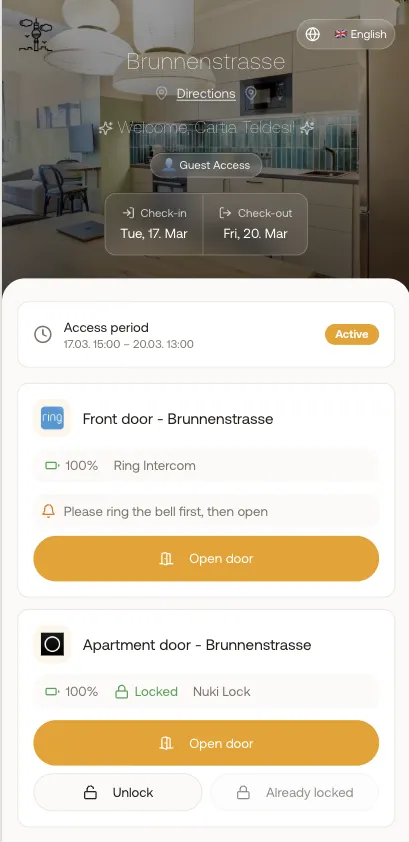
The portal shows the guest's name, booking dates, property name and address, and all assigned smart lock devices for that unit.
One-tap unlock: the guest presses a button, and the door unlocks via the smart lock API. A success animation confirms the unlock.
Multi-unit buildings show separate devices: "Building Door" and "Apartment Door" - guests unlock each independently.
Directions section shows the property address with a direct link to Google Maps navigation.
Wi-Fi section displays the network name and password for easy copy-paste.
The portal auto-detects the guest's browser language and displays in that language (7+ languages supported).
Branded: your company logo, name, and custom background image appear on the portal.
Feature deep dive
Detailed look at every capability within Guest Access Portal.
Access Token System
Each booking generates a cryptographic access token with a validity window (check-in to check-out). The token is embedded in the portal URL. Expired tokens show a "your stay has ended" message.
Device Display
All smart lock devices assigned to the booked unit appear as cards with the device name, type icon (lock, intercom, opener), and an unlock button. Battery-low warnings are shown if applicable.
One-Tap Unlock
Pressing the unlock button sends a command to the smart lock API. A loading animation plays while the command executes. On success, a confetti animation and green checkmark confirm the door is open.
Property Info Section
Below the door controls: property address with Google Maps link, Wi-Fi network name and password (with copy button), and any custom check-in instructions added by the host.
Multi-Language Support
The portal detects the guest's browser language (from navigator.language) and loads translations for German, English, French, Spanish, Italian, Dutch, and Polish. Fallback is English.