
Digital Guest Pages
Beautiful guidebooks in seconds
Create branded digital guidebooks with property info, house rules, local recommendations, restaurant tips, Wi-Fi details, directions via Google Maps, and emergency contacts. AI generates the entire page from a brief property description. Share as a link or QR code.
Try It Free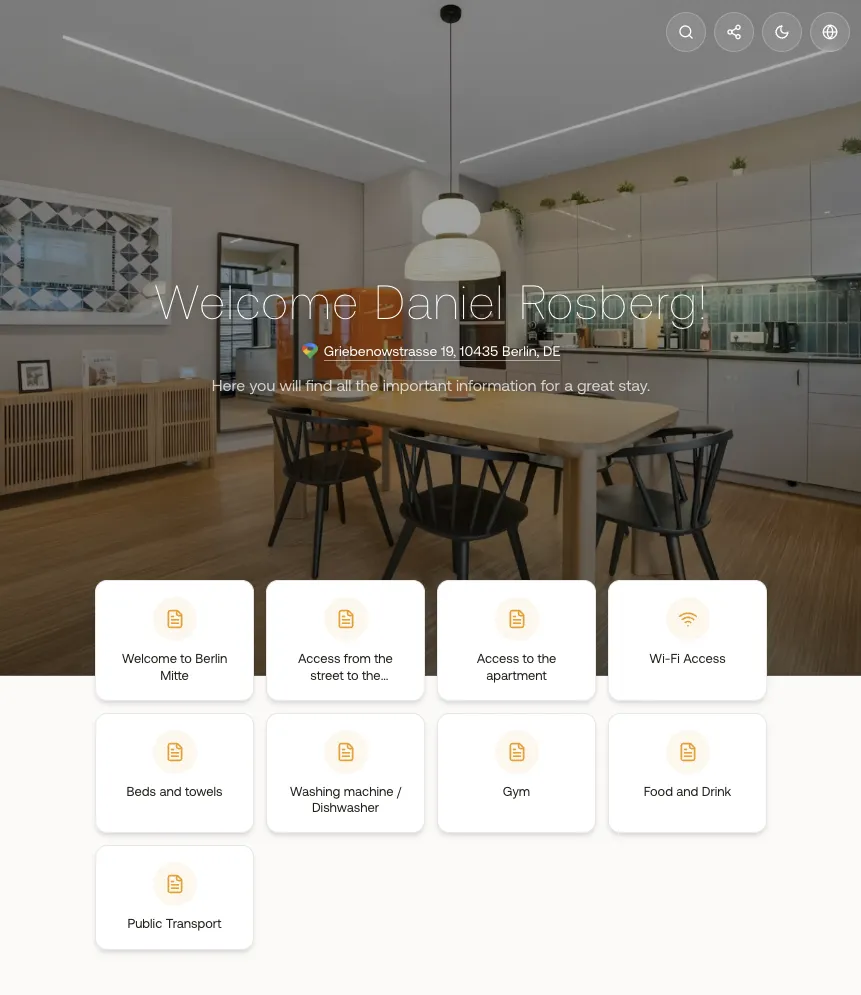
What you gain
Every feature creates value for both sides - you and your guests.
For the Host
Replace printed guidebooks with a living document
For the Guest
Everything you need, in your pocket
How it works
A step-by-step look at the experience.
Each guest page is linked to a specific unit and contains modular sections: Welcome, House Rules, Local Tips, Restaurants, Transport, Emergency Contacts, Wi-Fi, and more.
AI wizard: describe your property in a few sentences, and AI generates a complete guest page with all sections pre-filled. Edit any section to customize.
Share the guest page via a unique URL or auto-generated QR code. Guests open it in their phone browser - no app download needed.
Multi-language: the guest page content can be available in multiple languages, matching the guest's browser language.
Branded design: your company logo, colors, and style are applied automatically from your profile settings.
Active/inactive toggle lets you prepare guest pages before publishing them.
Feature deep dive
Detailed look at every capability within Digital Guest Pages.
AI Page Generator
The AI wizard asks you to describe your property (location, style, nearby attractions). From this, it generates a full guest page with sections for welcome, house rules, local tips, restaurants, transport, and emergency info.
Section Editor
Each guest page is composed of modular sections. Add, remove, reorder, and edit sections. Supported section types: rich text, image gallery, map embed, FAQ, contact info, and custom HTML.
Sharing & QR Codes
Each published guest page gets a unique URL (e.g., app.myxentra.com/g/abc123). Auto-generated QR code for printing and placing in the apartment. Include the link in automated check-in messages.
Unit Linking
Each guest page is linked to a unit. When you send a check-in message with the {{guest_page_link}} merge tag, the correct guest page for that unit is inserted automatically.
Preview & Publish
Preview the guest page as it will appear to guests. Toggle active/inactive to control visibility. Inactive pages are only visible to you for editing.