
Visual Calendar
Your entire portfolio at a glance
Full multi-property calendar with drag-and-drop booking management. See availability across all units, color-coded by source - PMS imports, direct bookings, manual entries. The calendar starts from yesterday so you always see what just checked out and what is arriving today.
Try It Free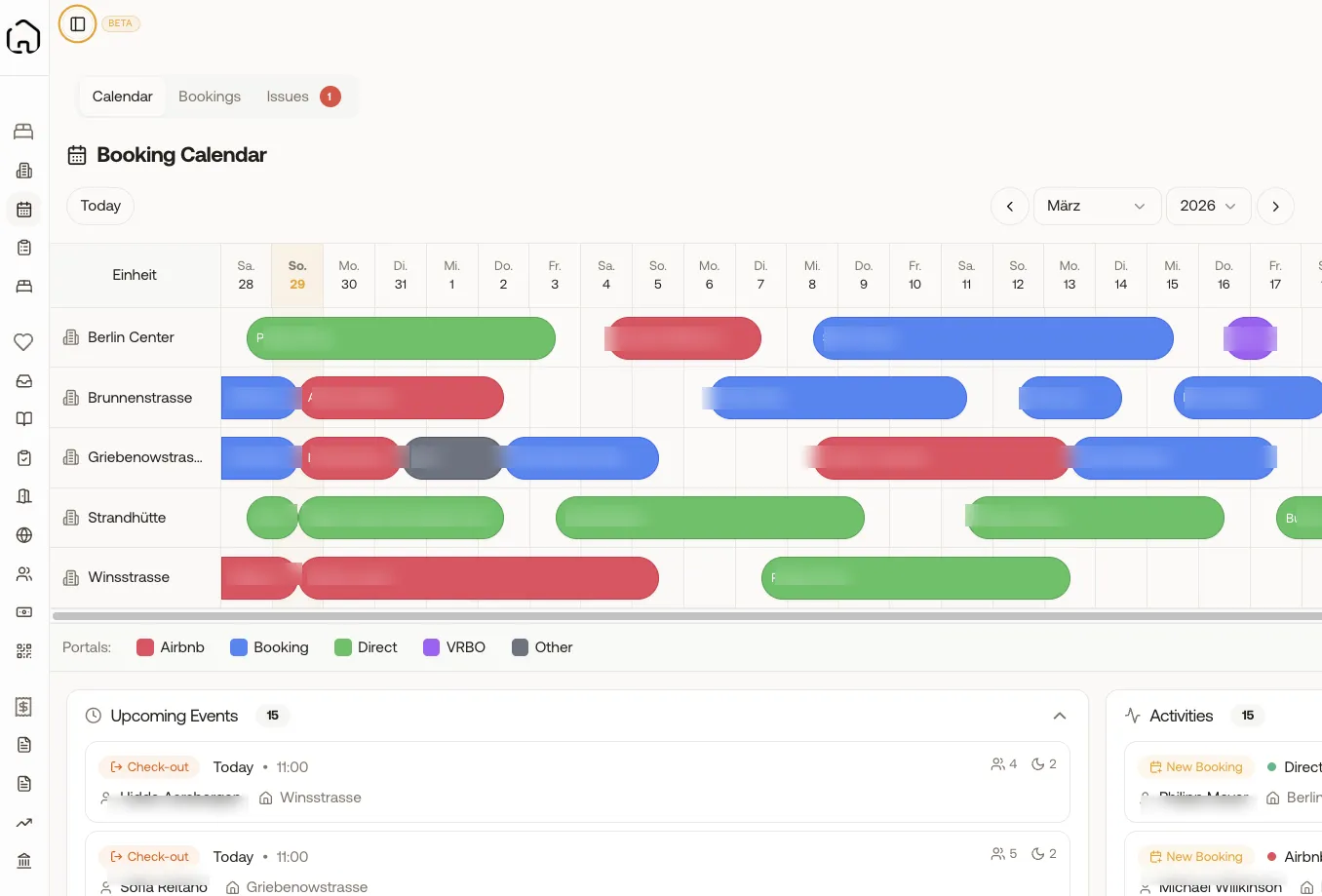
What you gain
Every feature creates value for both sides - you and your guests.
For the Host
Complete operational visibility
- See your entire portfolio in one view - no more switching between your PMS and spreadsheets.
- Instantly spot gaps, double-bookings, and upcoming turnovers so you can act before problems arise.
- Filter by property, building, or city to focus on what matters right now.
- The saved filter state means you open the calendar and it remembers exactly what you were looking at.
- Reduce booking errors - the overlap detection catches conflicts that manual tracking misses.
For the Guest
Accurate availability, no overbookings
- Real-time sync means guests never arrive to find their unit already occupied.
- Accurate availability across all platforms leads to faster booking confirmations.
- Better operational visibility means your host is prepared for every arrival - clean unit, fresh linens, access codes ready.
How it works
A step-by-step look at the experience.
The calendar displays a 6-week rolling view starting from yesterday, so you always see recent check-outs alongside upcoming arrivals.
Each booking bar is color-coded by source - PMS imports (blue), direct bookings (green), manual entries (grey) - so you instantly know where every reservation comes from.
Use the multi-unit selector to filter down to specific properties, buildings, or locations. Your selection is saved between sessions.
Click any booking bar to open a full detail dialog with guest name, contact, payment status, special requests, and channel-specific booking reference.
Create manual bookings directly in the calendar by clicking an empty slot - perfect for phone or walk-in reservations.
The overlap warning system automatically detects scheduling conflicts and alerts you before they become problems.
Feature deep dive
Detailed look at every capability within Visual Calendar.
Multi-Property Timeline
All units stacked vertically with booking bars stretching across dates. Scroll horizontally through time, vertically through properties. Each row shows the unit name, current status, and booking bars with guest names.
Channel Color Coding
Every booking source gets a unique color. PMS imports in blue, direct bookings in green, and manual entries in grey. At a glance, you know your booking mix.
Click-to-Create Bookings
Click an empty date range on any unit row to open the new booking dialog. Pre-fills the unit and dates. Add guest name, contact, price, cleaning fee, and any notes. Perfect for direct phone inquiries.
Upcoming Events Sidebar
A sidebar shows today's check-ins, check-outs, and active tasks. This is your daily ops briefing - who's arriving, who's leaving, and what needs cleaning.
Single-Unit Deep Dive
Click any unit name to expand into a monthly calendar view for just that property. See occupancy rate, revenue, and a monthly breakdown alongside the availability grid.
More in Operations
Unit Management
Manage every property detail
Booking Overview
Every reservation, one table
Tasks & Cleaning
Automated cleaning & maintenance
Nuki Integration
Native Nuki smart lock control
Ring Integration
Video doorbell & intercom control
Smart Lock Hub
50+ brands via Seam API
Access Log & Audit
Complete security tracking
Pricing & Revenue
Smart pricing across your portfolio
Open API
Build on top of Xentra